Rollover, Rebuilt - It Finally Knows Who Rides the Bus
R
RollCall Team
RollCall Team
Next year's bookings, built from how your students actually travelled this year.
Every school that has run a RollCall rollover knows the moment.
You reach the bookings step, and RollCall asks you to choose a date. One date. One ordinary week in the middle of the year that will decide who has a seat next February.
So you think about it. You avoid the athletics carnival. You avoid the week half of Year 9 was on camp. You pick something that feels typical, you click through, and you hope.
The trouble with one day
A single day is a reasonable snapshot of a five-day traveller. It is a terrible snapshot of everyone else.
If a student travels Monday, Wednesday and Friday, and you sampled a Tuesday, they didn't roll over at all. If you sampled a Monday, they rolled over as a five-day traveller - holding a seat on Tuesday and Thursday that they will never use, on a bus with a waitlist.
Casual travellers had it worse. Their travel is, by definition, irregular. A one-day sample either caught them or it didn't, and mostly it didn't.
The result was familiar. Rollover finished, term started, and the first fortnight of the year was spent repairing it - adding the families who were missed, cancelling the bookings nobody wanted, and reconciling a bus that looked full on paper and half-empty on the road.
The information you needed was already sitting in RollCall. A full year of scans, bookings and absences for every student. Rollover just wasn't looking at it.
Now it is.
So what's changed?
Rollover is no longer a single decision. The wizard now walks you through the process one step at a time - and the booking step at the heart of it has been rebuilt from the ground up.
Instead of copying one day forward, RollCall measures how much each student used the bus across a period you choose, works out the days they typically travel, and builds next year's bookings from that pattern.
You stay in control the whole way. Nothing is written to next year until you have reviewed it, route by route, and said yes.
Step by step
1. Prepare
The opening stages will feel familiar, because they haven't changed in shape.
Confirm your term dates.
Tell RollCall which year level is your final year.
Set your session start.
Order any hardware you need.
You then import your new students and parents, and RollCall clones your routes and stops into next year, generating the new year's calendar from your term dates.
One improvement worth knowing: the new students and parents step now always uses our newer, faster import system - the same asynchronous import used elsewhere in RollCall, and the one covered in our intake workflow article. Larger files, clearer progress, fewer surprises.
Importantly, next year's routes and calendars are created first. Everything that follows books students onto structure that already exists.
2. Tell RollCall what counts as "uses the bus"
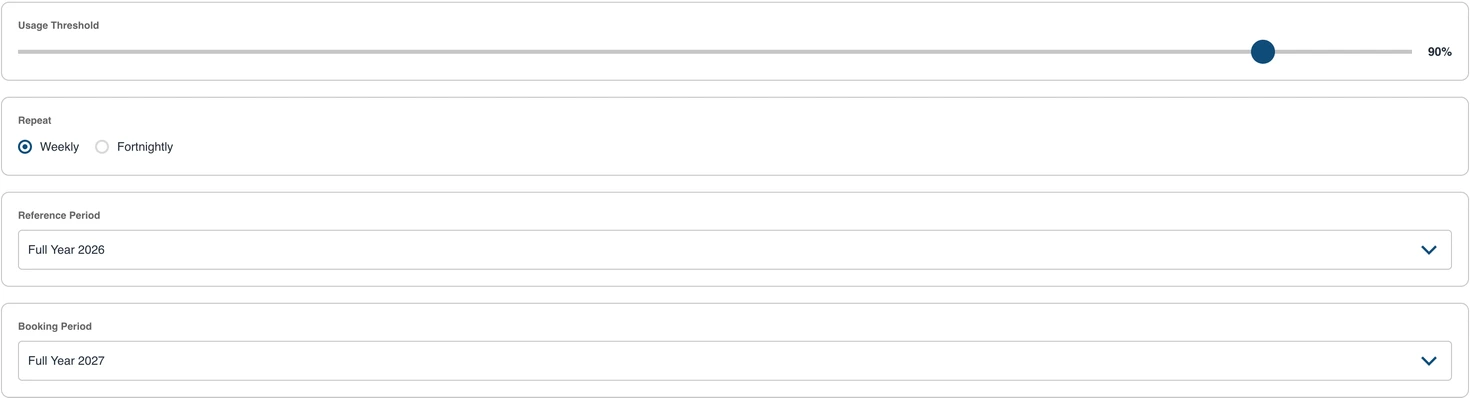
This is the step that replaces picking a day, and it asks four questions.
What period should count as evidence? Your reference period. The full year gives you the most complete picture. Term 4 is useful if your travel patterns changed mid-year - a new housing estate, a timetable change, a route redesign. You can also set a custom range.
How much riding counts as riding? Your usage threshold, set as a percentage of scheduled trips. Set it to 90% and a student who booked at least 90% of their scheduled trips rolls over on their existing pattern. Lower it to 60% and you cast a wider net, picking up the less consistent travellers. It is the same slider you may already have used on the Route Builder Rollover tab.
Weekly or fortnightly? Your booking cadence, for schools running an alternating timetable.
What part of next year are you booking? Your booking period. This defaults to the full 2027 year, with presets for Term 1 and a custom range if you'd rather commit to less and revisit later.
The four questions, answered once: how much riding counts, weekly or fortnightly, what period counts as evidence, and what you are booking. Sample data.
Set these once and they apply across the whole rollover. You can fine-tune individual routes afterwards.
And your final-year students are handled for you. The answer you gave to "what is your final year?" is respected at the source - graduating students never appear in an included list, no matter how faithfully they caught the bus.
3. Sort out the students who ride more than one route
Some students genuinely use two routes. A different pickup on the days they go to their grandparents' place. A sport afternoon that puts them on a different bus home.
Where your route group only allows a student on one route, RollCall doesn't guess.
If one route holds a clear majority of that student's travel - more than half - it becomes their primary route and they are included there. If it's a genuine split, RollCall stops and asks you which route keeps which days.
You can also deliberately keep a student across two routes where the days don't clash - Monday and Wednesday on one, Tuesday and Thursday on the other.
These decisions are made before anything is booked, not discovered halfway through.
4. Review, route by route
Before a single booking is written, you get a summary for every route.
Who is included, and the days they'll travel.
Who is excluded, and why.
Anything that still needs your attention.
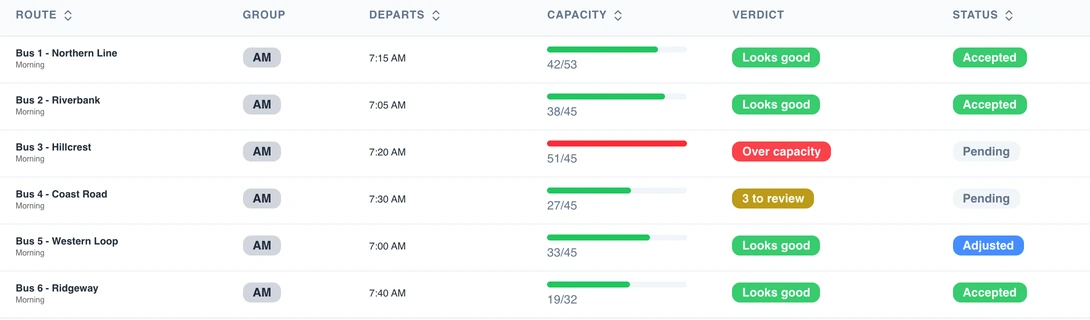
Each route gets a verdict before anything is written. Bus 3 is carrying 51 into 45 seats - and rollover will not continue until you deal with it. Sample data.
If a route looks right, accept it without opening it. If it doesn't, open it and adjust - give that route its own threshold, or set the days and students explicitly.
Your work is saved as you go. Start on a Tuesday afternoon, get pulled into a bus breakdown, and come back Thursday to exactly where you left off.
Rollover will not let you proceed until every route has been accepted or adjusted. That is deliberate. Nobody should discover next year's bookings in February.
5. Press go
When everything is settled, you execute.
RollCall works through your routes in the background, one at a time, applying the same capacity checks and duplicate protection used everywhere else in the system. You don't need to sit and watch it. If a route fails, you can retry just that route rather than starting again.
You'll also choose how the bookings are written. Update Only - the default - touches only the students the rollover selected, leaving any bookings you've already made alone. Clean Slate clears the route for that period first and writes a fresh set.
Nobody falls through the cracks
This is the part we're proudest of.
When the rollover finishes, you get a worklist of every student who ended up without a booking - and, for each one, the reason why.
Below your usage threshold.
A new enrolment with no travel history, so no threshold could ever select them.
A casual, irregular rider.
Manually excluded during your review.
Caught in an unresolved conflict.
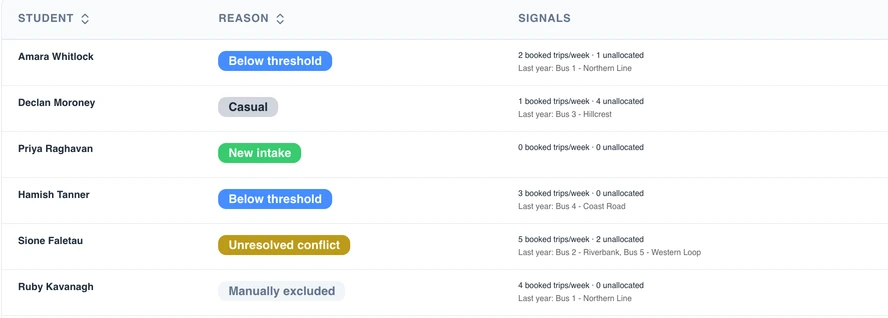
Every student the rollover could not book, why, and the evidence behind it - so you can decide without going digging. Sample data.
Each row carries the evidence behind it - how many trips they booked, where else they were seen travelling, and which routes they were on last year - so you can make a decision without going digging.
From there, allocate them to a route or dismiss them with a note. The list stays put until every student is dealt with, so you can work through it over days or weeks rather than in one sitting.
The students who used to be quietly missed are now a list with your name on it.
And if it isn't right?
A rollover can now be completely undone.
Every booking the rollover creates is stamped with the run that made it, and every cloned route is marked with the route it came from. That record is what makes a clean reversal possible - next year's cloned routes, their calendars and every booking on them are removed, and your current routes come back exactly as they were.
You can then start the rollover again from scratch.
Reversal is a significant action, so it sits with your Business Admin and our support team rather than in the everyday wizard. If a rollover goes sideways, contact support and we will put it back.
One thing to note: students you flagged as final-year are deactivated during the rollover, and a reversal does not switch them back on. If you reverse a rollover, check your graduating cohort before you re-run it - and our support team will flag exactly who is affected.
Our recommendation: start in Term 4
After more than ten years in school transport, our advice hasn't changed. Have next year's transport ready by November.
Planning early lets you:
Open registrations during Term 4, while families are still at school.
Give parents certainty before the summer holidays.
Forecast demand and review underutilised services before another year begins.
Start the new school year confidently, instead of firefighting through the first fortnight.
There's a practical reason to start early this year, too. The new selection step is only as good as the travel data behind it - so the tidier your bookings and absences are through Term 3 and Term 4, the sharper your rollover will be. Encouraging families to cancel bookings they don't need, and recording absences properly before the bus departs, directly improves what rolls into 2027. Fifteen minutes a morning on your exceptions is the single best preparation you can do.
This is also the natural companion to the work we've been doing in SmartRoute. Review your network, redesign where it makes sense, schedule the new routes - then roll your students onto them based on how they actually travel.
Plan the routes. Then fill them with confidence.
What this means for your rollover
You no longer have to pick a day and hope.
You choose what counts as evidence.
You choose how much riding counts.
You review every route before anything is written.
You get a list of everyone who was missed.
And if it's wrong, it can be undone.
Rollover has always been the biggest administrative task of the RollCall year. It is now a guided process, built on what your students actually did - rather than a single day, and a hope.
Join us for the Rollover webinar
We'll walk through the new wizard end to end, show you how to choose a threshold that suits your school, and answer your questions before Term 4 planning begins.
Dates and registration details are on their way to your inbox. If you'd rather not wait, email support@rollcall.com.au and we'll save you a seat.
The Route Rollover guide in our support centre covers the settings behind the wizard.