
The Enhanced Driver App: faster scanning and a new Bus Guardian flow
The Enhanced Driver App rolled out on Friday 19 September, with quicker scanning, a purple Bulk Scan Off button at the bottom of the screen and a redesigned Bus Guardian check.
We've made improvements to RollCall to bring you a smoother, faster, and more secure experience. Thank you for your continued support.
Enhanced Driver App
RollCall is excited to announce the launch of our Enhanced Driver App.
Most of the new features are about making scanning quicker, but you'll also notice some useful changes on the screen. See further down for a breakdown of what drivers will see.
- Please print or forward this to the drivers and bus coordinators.
How and when the change will roll out
New app deployment date: Friday 19th September, prior to AM routes.
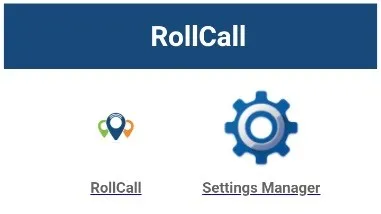
Inform your drivers to turn on the Driver Device 10 mins before starting (leave it on the initial menu screen, pictured below).
The software will update automatically.
What's changed?
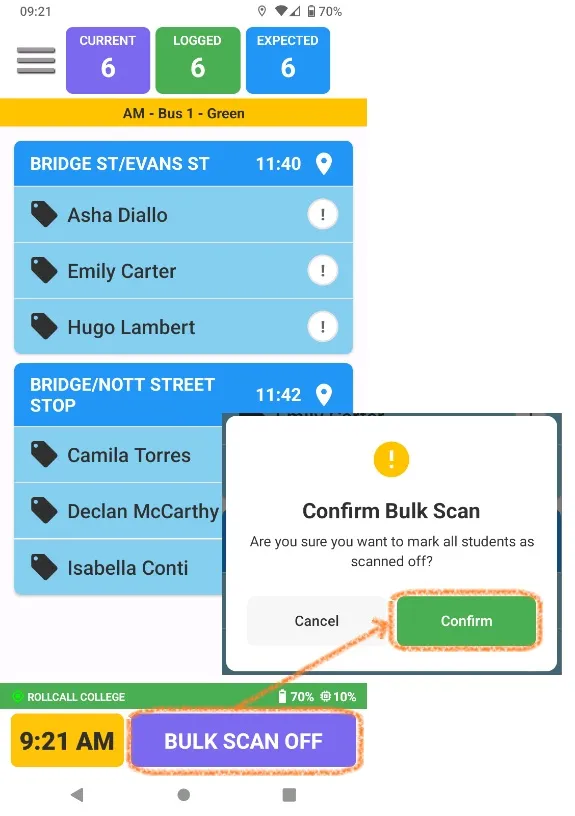
New Bulk Scan Off button for AM runs
The Bulk Scan Off button has been moved to the bottom of the screen.
The button is now purple, making it easier for drivers to quickly locate during AM runs.
Changes to Bus Guardian
- The Bus Check section has been redesigned with a larger blue button for greater visibility.
- Once all students have tagged off, the process will now start automatically.
- If needed, drivers can press the blue button to be guided step-by-step through the required checks before moving into Route Complete.
- A new option, "Skip Bus Guardian", has also been added to bypass the Driver Check mode if required.