
Ask Rolly rollover help, request-matched bookings and sync alerts
Help and Ask Rolly built into year-to-year rollover, bus bookings that follow the days families asked for, and email alerts when a school management system sync needs attention. Plus 14 fixes.
Please find below our latest release notes, including new features and enhancements recently added to the RollCall system. These updates are designed to improve day-to-day transport management and support a smoother experience for schools, staff and families.
In this release
Year-to-year rollover now has help built in, including Ask Rolly. Bus bookings now follow the days families asked for, and you can get an email when your school management system sync needs attention. We've also made smaller improvements and fixes across bookings, payments, scanning and parent communications.
- Help right where you set up the new year. Guides, common questions and Ask Rolly, without leaving the year-to-year rollover screen.
- Bookings that match what families asked for. Booking forms ask only for what you need, and Seat books only the days parents requested.
- Email alerts for sync issues. Find out when your school management system sync needs attention, before the next school day.
- Other improvements. Three smaller changes across the Parent App and Admin Console.
- What we've fixed. Fourteen fixes across bookings, payments, scanning, accounts and welcome emails.
Get help without leaving year-to-year rollover
Guides, common questions and Ask Rolly, right beside your work.
School administrators can now open help from the year-to-year rollover screen and ask Rolly about the process. For now, help is only available on this screen.
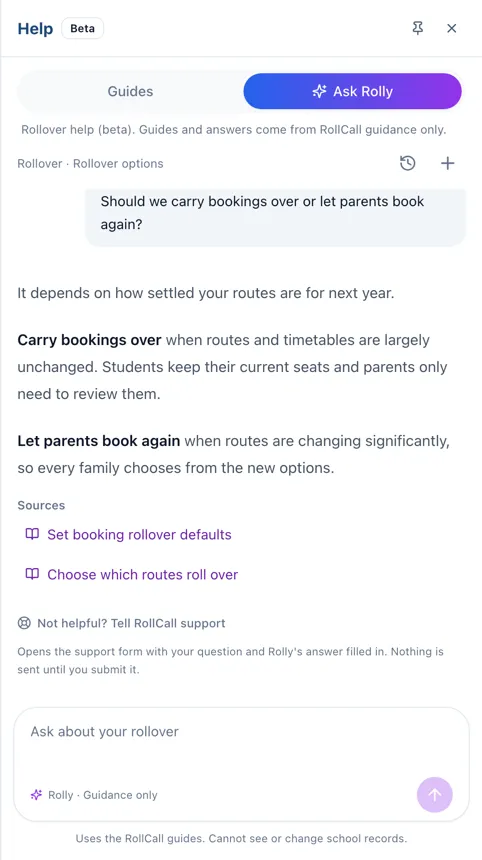
- Open it your way: Select the green Help button, or press the ? key.
- Guides for where you're up to: See guides for the stage you're on, plus the full guide list, common questions, guides you've viewed recently and troubleshooting tips.
- Keep it open: Guides open inside the Help panel. Select Keep open to leave help on screen while you work.
- Ask Rolly: Choose a suggested question or type your own. Answers come from RollCall's own guides and link to the guides they used.
- Pick up where you left off: Go back to saved chats, or get more help from our support team.
Why it matters: You get answers during one of the busiest setup jobs of the year, without hunting through guides or waiting on a call.
Book students exactly as families requested
Forms ask for what you need, and bookings follow the parent's request.
Bus booking forms and Seat now work together, so what a family asks for is what gets booked.
- Requested days, filled in: When you book a student in Seat, the dates and weekdays come straight from the parent's request. Students are no longer booked onto rolls for days they didn't ask for.
- A familiar booking screen: Seat now uses the Bus Booking screen you already know. The route list shows only services running on the dates you've chosen. Once you book, Seat moves on to the next requested service or student.
- New students in one step: Create a student from a pending application and link an existing parent, or add a new one, all in the same window. RollCall suggests parents with a matching email or phone number. You can fix a missing email or an incorrect phone number before you select Create student & mark ready.
- Year level from a list: Families now choose Pre-K, Kindergarten or Year 1 to 12 instead of typing it in, and the year level fills in for you when you create the student. Applications sent before this change still need a year level chosen.
- Ask only for the location you need: In the intake settings under Bookings Setup, choose whether the form asks for a home address or a pickup stop, and whether parents have to fill it in. Parents can still type a full address if no suggestion appears.
Why it matters: Fewer corrections after booking, no students on rolls for days they won't travel, and no collecting details you don't need.
Hear about sync issues before the school day
An email when your school management system sync needs attention.
A sync is the regular update that brings student and parent details from your school management system into RollCall. School administrators can now get an email when a sync fails, finishes with errors or warnings, or doesn't run when expected.
- What's in each alert: A summary of the problem and a link to the school management system dashboard.
- Quiet when all is well: You won't get an email when a sync runs without problems.
- Choose who's told: Choose who gets alerts on the Notification settings screen in the Admin Console.
- Ready from day one: Whoever finishes setting up the school management system connection is added to the alert list automatically.
Why it matters: Missing or out-of-date student and parent records get spotted and fixed before the next school day.
Other improvements
Smaller changes worth knowing about.
Parent App
- At schools that use only single sign-on (one school login for everything), parents activating the new Parent App now go straight to the school's sign-in screen after entering a one-time code. There's no RollCall password to create. Nothing changes at schools that also allow password sign-in.
Admin Console
- School details now live under Organisation in the Settings Hub. Authorised administrators can update the school name, phone number, email address, website and the Driver App assistance number setting there.
- Bus Admins can now view and export these reports: Student Transport, Trip Details, Trip & Exception Details, Trip Summary, Transport screen and Student Code History. Large reports download in full, with no separate size limit. Only authorised users can see them, and only for their own school.
Fixes
Fourteen fixes across bookings, payments, scanning, accounts and welcome emails.
Bookings and routes
- Rebooking no longer removes records for trips that have started, finished or already have a scan. Previous stop details are kept when a route's stops change, and removed bookings no longer attract a non-travelled surcharge.
- Parents can now delete bus bookings in Parent Web if your school allows it.
- Stop CSV uploads now flag, row by row, any zone names your school doesn't have, before you import.
- Booking calendars show square day markers and legend symbols again, instead of round dots.
Payments and fares
- Non-travelled surcharges are no longer charged when payments are switched off. This applies whether the driver completes the trip or an administrator signs students off manually.
- Scheduled charges now include every eligible student, rather than stopping after the first 1,000.
- Students who board between the last morning pickup and campus are now charged from the last pickup stop, not from campus. A student who boards outside an approved stop area also stays flagged on the Transport screen after they get off.
Scanning and the Driver App
- Boarding totals and student statuses in the Admin Console stay accurate when lots of students scan on quickly, one after another.
- Skipping a Driver Check now shows that it's working. If it fails or takes too long, you'll see a message with the option to try again.
Accounts and contact details
- Administrators can save changes to an existing admin without entering a phone number.
- A former parent or guardian of a current student can now be restored to Active or Awaiting activation, with a reason recorded. Their existing access settings stay the same.
- At schools outside Australia, phone numbers no longer default to +61 in phone fields, CSV imports or the school management system sync.
Welcome emails
- The school logo no longer looks stretched on iPhone.
- The stray label next to the app download buttons is gone, and the setup link now opens the Parent Web sign-in page instead of an app store preview.
Questions about this release?
Our support team can walk you through any of these changes. Call 1300 821 116 or email us.