
Bulk booking cancellations, school-managed settings and SMS credits
Administrators can cancel bus bookings in bulk across a date range, manage Driver App, Parent App, route and RollCall Pay settings in the Admin Console, and buy SMS credits in Messaging Hub.
Please find below our Release Notes for new features and enhancements to the RollCall system.
New features and enhancements
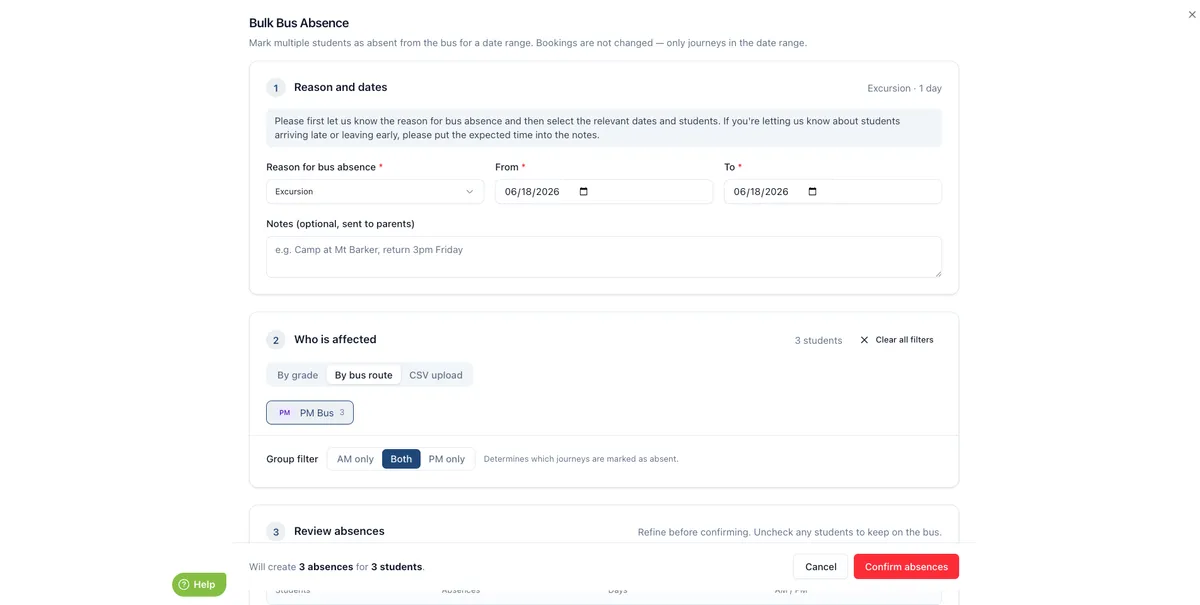
Bulk bus booking cancellations
School administrators can now cancel bus bookings for multiple students across a chosen date range, reducing manual updates for large events such as camps, excursions and sports days.
Charge for unused transport bookings
Schools using RollCall Pay can now apply a surcharge when booked students do not travel, helping discourage no-shows and encourage absences to be submitted in advance.
Driver App settings management
School administrators can now manage key Driver App scanning and interface settings in the Admin Console, such as whether manual tap warnings appear or whether drivers can view student information.
Parent and absence settings management
School administrators can now manage Parent App and absence reporting settings directly in the Admin Console, including available app tabs, bus change behaviour and absence email recipients.
RollCall Pay settings tab
A new RollCall Pay settings tab allows school administrators to view and manage payment-related settings such as fare loadings, balance alert thresholds and parent Add Credit visibility.
Route settings in Admin Console
School administrators can now view and update more route settings in the Admin Console, including dynamic stop times, driver stop visibility, route messages and default stop values.
Organisation Settings redesign
The Organisation Settings screen has been redesigned into clearer sections, making it easier to review and manage core settings such as time zone, country, date format, wrong stop alerts and two-factor authentication.
Notification template settings
A new Settings tab on the Notification Template screen allows school administrators to manage active notification options, including bus change notifications, payment notifications and credit alerts where relevant.
School-managed settings information
School-managed settings now include clearer information about what each setting controls, what areas it affects and whether it can be viewed or edited.
Purchase SMS credits in Messaging Hub
Schools can now purchase SMS credits directly from the Messaging Hub, with successful purchases updating the balance straight away and appearing in Message Logs for clearer tracking.
More consistent live route updates
Live route information now stays more consistent across route status, driver details and student lists, reducing the chance of conflicting trip information.
Bus Activity Report stop details and date
The Bus Activity Report now shows the original route, stop and report date when a parent-created absence removes a student from a service, giving administrators clearer transport change context.
What's fixed?
Multiple same-session bookings via Bulk Booking
Schools that allow multiple bookings for the same morning or afternoon trip option can now create those bookings through Bulk Booking. This makes it easier to manage students who need more than one booking in the same session, such as a campus shuttle plus a regular route.
Missing students in route planner
Students with saved addresses now appear in the route planner even if their address cannot be mapped, helping schools identify and correct address issues before finalising routes.
Student balance display
The balance shown on a student’s Transactions tab now matches the latest transaction total, making account checks more reliable.
Australian mobile number formatting
Parent mobile numbers imported from spreadsheets now save in the correct international format, helping SMS notifications reach families as expected.
Admin role access updates
Administrator permission changes now match the newly selected role once saved, preventing users from retaining access from a previous role.
Morning route navigation
Morning route navigation now guides drivers to the correct next stop and switches between map and student list views at the right time.
CSV validation preview
CSV import validation previews now refresh correctly so validation messages match the row shown for review.
Credit alerts for additional children
Parents now receive a separate credit alert email for each eligible child when multiple children meet the alert conditions.
Parent deactivations after Wonde sync
Parent accounts are now only made inactive after a genuine school management system change or deliberate school update, helping prevent incorrect Parent App access changes.
Bus Changes Report statuses
The Bus Changes Report now correctly shows students as Added when they receive a bus booking for the first time.
Completed bus check statuses
Completed bus checks now keep the correct status, icon, driver login and completion time after the Transport Screen is refreshed.
Transit Times Report estimates
The Transit Times Report now shows the correct estimated transit time for each route, including in exported reports.