
AI report assistant, LMS Campus sync control and booking fixes
A new AI assistant suggests reports from plain-language questions, schools can stop LMS sync updating the Campus field, and parents can no longer book once a route has started.
Please find below our Release Notes for new features and enhancements to the RollCall system.
New features and enhancements
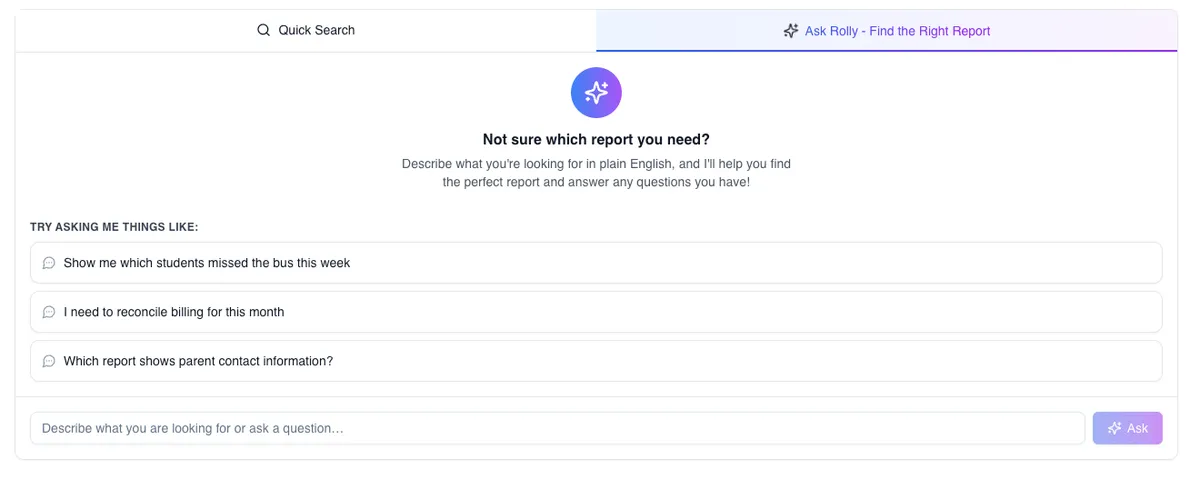
New: AI Assistant for finding Reports
School administrators can now ask questions in plain language on the Reports page and receive suggested reports to run.
Improvements
Exclude Campus from LMS sync
School administrators can now choose to stop the LMS sync from updating the Campus field.
Better reliability during peak travel times
We’ve improved RollCall’s reliability during busy morning and afternoon school transport periods.
Bug fixes
Fixed Bus Activity timezone display
Timestamps in Bus Activity now display in the expected local timezone for the school.
New bookings blocked after route starts
We fixed an issue that allowed parents to create a new bus booking after a route had already started.
Expired code error fixed for admin sign-in
Fixed an issue in the Admin Console where some school administrators using two-step verification were blocked from signing in after entering their verification code.
Additional fixes and reliability improvements
These were included in the full release notes.
- Only available buses shown – Parents can now only book buses that are actually available, reducing confusion and errors.
- Clearer error messages for bus changes – Parents will now see specific reasons when a bus change can’t be completed.
- Duplicate CSV uploads prevented – Stops accidental duplicate data when importing files.
- Booking restriction checks fixed – Booking pages now load correctly without errors.
- Completed routes retain driver details – Ensures accurate records for reporting and follow-up.
- Scan alerts restored – Parents will now reliably receive scan on/off notifications again.
- Clearer payment error messages – No more confusing “[object Object]” errors—parents now see meaningful messages.
- Bookings tab fixes – Booking IDs display correctly, filters work as expected, and student selection is more intuitive.
- Search LMS sync records – Admins can now search incoming LMS data to quickly understand missing or changed records without needing support.
- Simplified Sticitt setup – Only the Merchant ID is now required, reducing confusion during configuration.