
2027 rollover, welcome email preview and custom data sync
Getting schools ready for 2027: start the year rollover, preview and tailor the parent welcome email, and send data from a custom school system through a secure API. Plus City Mode and fixes.
Please find below our latest release notes, including new features and enhancements recently added to the RollCall system. These updates are designed to improve day-to-day transport management and support a smoother experience for schools, staff and families.
New features and enhancements
This release is all about getting your school ready for 2027. We've focused on the jobs that matter most at this time of year, rolling over to next year and welcoming new families, so you can set up next year with fewer surprises.
Give parents a clearer welcome
You can now preview the parent welcome email exactly as parents will see it, before you send it.
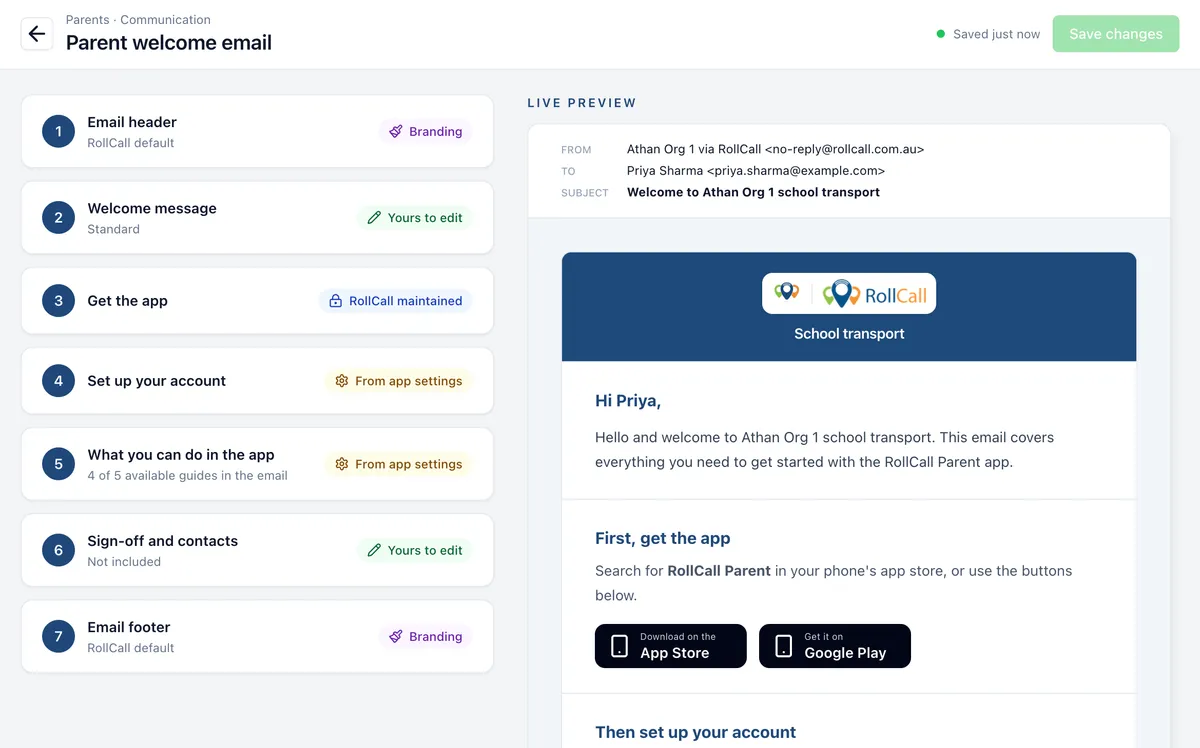
- Add your school's greeting and an optional closing.
- Choose which Parent App features the email explains. You can pick from any feature your school has turned on, so parents get guidance that matches how your school uses RollCall.
- The steps for account set-up and first sign-in stay standard, so every parent gets the same clear instructions.
Find it in the Admin Console under Parents > Communication > Parent welcome email.
Prepare bookings for 2027
Every school can now start the 2027 year rollover. Your account has a new rollover process with the status Not Started, and last season's information is still there for reference.
Before you start
Decide how to set up next year's bookings. You can copy students' existing bookings, or base them on actual riding. Actual riding looks at the days each student travels consistently and makes those their regular travel days. If you choose actual riding, review any alerts about students who don't have a regular travel pattern.
How the rollover helps
- It opens with your most recent term already selected.
- It finds students who travel on more than one route.
- If a student has no clear main route, it doesn't assign one automatically. It tells you that you need to book that student yourself.
- The selection step shows travel in days per week, so it's quicker to check.
- A live preview shows the booking results before you save.
If a booking period is missing, create it from your term dates or add it manually. You don't need to leave the rollover to do it.
Send your own school data securely
If your school uses a custom system instead of one of RollCall's supported school management system integrations, you can now send student and parent data to RollCall yourself. Your system connects through a secure API (application programming interface) endpoint, and you choose exactly what it shares.
- Create, replace or turn off the secure access key for your connection.
- Have your system send updated records every night.
- Upload student and parent data yourself when you need to.
- RollCall checks uploaded data before you preview and sync it, so you can find and fix missing or invalid details first.
Supporting enhancements
Live tracking
Driver locations now use an improved live-tracking delivery service. Drivers keep their normal Global Positioning System (GPS) settings and workflow.
Navigation and route directions
- Drivers can trial City Mode for more reliable navigation on routes through inner-city streets or high-rise areas, where tall buildings can interfere with the GPS signal.
- During turn-by-turn navigation, drivers can preview the next section of their route.
- Drivers can see when the app is ready to switch to the student list automatically.
- Schools can export planned route directions as a PDF, with stops, distances, travel times and route totals.
Smoother tracking for parents and drivers
- On the Parent App tracking map, the bus now stays on the road during navigation instead of jumping around.
- Drivers get back to their student list faster after they arrive at an approved stop area.
Faster record editing
- The Save and Delete buttons stay visible while you edit a record.
- New routes and parents stay open after you save them, so you can finish setting them up without searching for them again.
Messaging and Parent App updates
- A new $500 (AUD) SMS credit package includes 5,555 messages, about 9 cents each.
- Parent App 4.0.5 improves booking options, stop information and journey updates.
- At schools that use single sign-on, parents can activate their account without creating a RollCall password they'll never use.
Fixes
Payments and SMS
- Eligible Non-Travelled Surcharges now apply to completed afternoon routes.
- Your first SMS credit purchase now updates your balance correctly.
- SMS messages on New Zealand routes are now delivered.
Parent communications and access
- Parent welcome email confirmations now show the status of each email.
- CSV imports now update parent access correctly.
- Parents no longer get blank credit alerts when alerts are turned off.
Route monitoring and reporting
- Route monitoring now shows every valid scan.
- Bus absence reports show only journeys from the date you select.
- Stop Guardian totals now match the exceptions shown for your selected dates.
Admin Console settings and imports
- Organisation settings now save correctly.
- When you change a stop, you now see every eligible stop on the route.
- Student imports stay in review until you choose a valid Payment Charging Option.
International schools and currencies
- Phone numbers use your account's country code everywhere in RollCall.
- The Parent App shows your school's currency when parents add funds.
Parent App journey updates
- The Parent App shows a child as travelling until the bus reaches their stop.
- Route details now update after you add an unallocated student.
- Trips for long date ranges load more reliably.
Driver and transport records
- Behaviour exceptions reported by drivers stay visible on the Transport Screen.
- Passenger counts update after offline scans sync.
Setup and sync reliability
- You now see a clear confirmation when you create a parent.
- Sync history loads more reliably.
- Multi-day bookings finish processing before you're taken to the Transport Screen.